June 5th 2026 - Things I Worked On
Tektite App
I disovered Tektite. An app to preview and edit markdown with a nice node graph of connected files.
First I cloned the repo:
git clone --depth 1 git@github.com:mathiasconradt/tektite.git
Read through the code to see if I noticed anything suspicious. Having found nothing, I then ran:
npm install
npm start
Application installed and started right away.
I opened the github project as a vault project in the app and played around with it, rearranging the panes. After closing and reopening the app I noticed that it remembers the pane arrangement. I did some digging and found that the app creates the following directory:
~/Library/Application Support/tektite/"
Inside this directory there is a "Local Storage/leveldb/000003.log" file which contains some binary and a line that says:
{"sidebarWidth":242.046875,"editorRatio":0.78,"sidebarTagsHeight":90.51953125,"sidebarGraphHeight":347.37890625}
I also noticed that the table of contents links don't navigate to the sections of the md file. I opened an issue about it here.
Update: This was resolved here.
The app has a nice markdown preview built in but no code syntax highlighting.
Print button doesn't seem to be working. Looking at the console logs it says, "print failed No printers available on the network" but there's no use feedback. Opened an issue here.
Update: This was resolved here.
Dragging and dropping images, from Finder on MacOS, into the Tektite file tree does not work. You can, however, drag and drop images directly into the markdown of a node and it will copy the image to the vault directory. Opened an issue here.
Update: This was resolved here.
It has the ability to add tags with #tag and you can then find files with those tags but it doesn't navigate to the actual tag when opening the file containing it.
There's a way to search for text inside of an md file but no way to search in the preview.
The documentation says:
Click any tag in the tag cloud to filter the file tree to show only notes that contain that tag. Click the tag again or clear the search to remove the filter.
But when you click the tag a second time it doesn't clear the filter. I opened an issue here and a fix for it here.
Update: PR got merged.
Dragging and dropping a directory from the user file system into the app is not working. Opened an issue here and submitted a fix here.
Update: PR got merged.
Spent some time trying to change Elfeed Summary layout
I want the layout to be displayed in multiple columns instead of one. But no luck yet. I'm pretty sure the function that needs to changed, or at least the entry point to what I'm trying to do, is elfeed-summary–render.
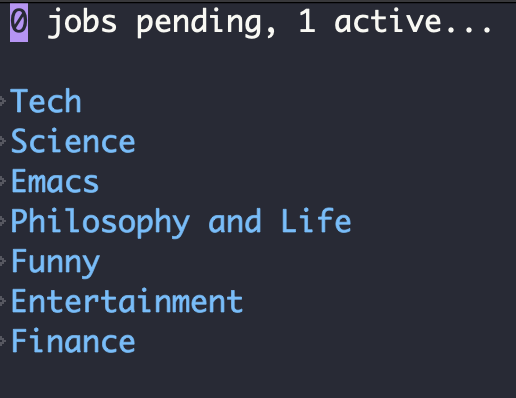
Found an alternative with setting elfeed-summary-settings variable. It doesn't do columns but it organizes the feeds by groups and defaults to them being closed so I get a better view of everything.
Created Elfeed Summary Groups
I wanted a better way to organize my Elfeed feeds so I learned that Elfeed Summary has groups.
(setq elfeed-summary-settings
      '((group (:title . "Tech")
               (:hide t)
               (:elements
                (query . ((and tech (not emacs)) (and coding (not emacs))))))
          (group (:title . "Science")
               (:hide t)
               (:elements
                (query . science)))
        (group (:title . "Emacs")
               (:hide t)
               (:elements
                (query . emacs)))
        (group (:title . "Philosophy and Life")
               (:hide t)
               (:elements
                (query . (philosophy life vlog))))
        (group (:title . "Funny")
               (:hide t)
               (:elements
                (query . funny)))
        (group (:title . "Entertainment")
               (:hide t)
               (:elements
                (query . (art games entertainment documentary))))
          (group (:title . "Finance")
               (:hide t)
               (:elements
                (query . finance)))))